 Legion AI
By Casey Morgan Legion AI editorial pen name
How to Automate Appointment Booking for Service Businesses
Appointment booking automation is the workflow that turns a customer's intent into a valid calendar event without making a staff member coordinate every step. A booking page can be part of that workflow, but the complete system also has to decide who should be booked, which slots are genuinely available, what information the team needs, and what happens after the appointment is created.
That distinction matters for service businesses. A public link is enough when every customer can book the same meeting. It is not enough when the business needs to qualify the lead, choose a provider, respect service-area rules, collect a deposit, or rescue someone who asks for an appointment by phone or text.
What appointment booking automation actually includes
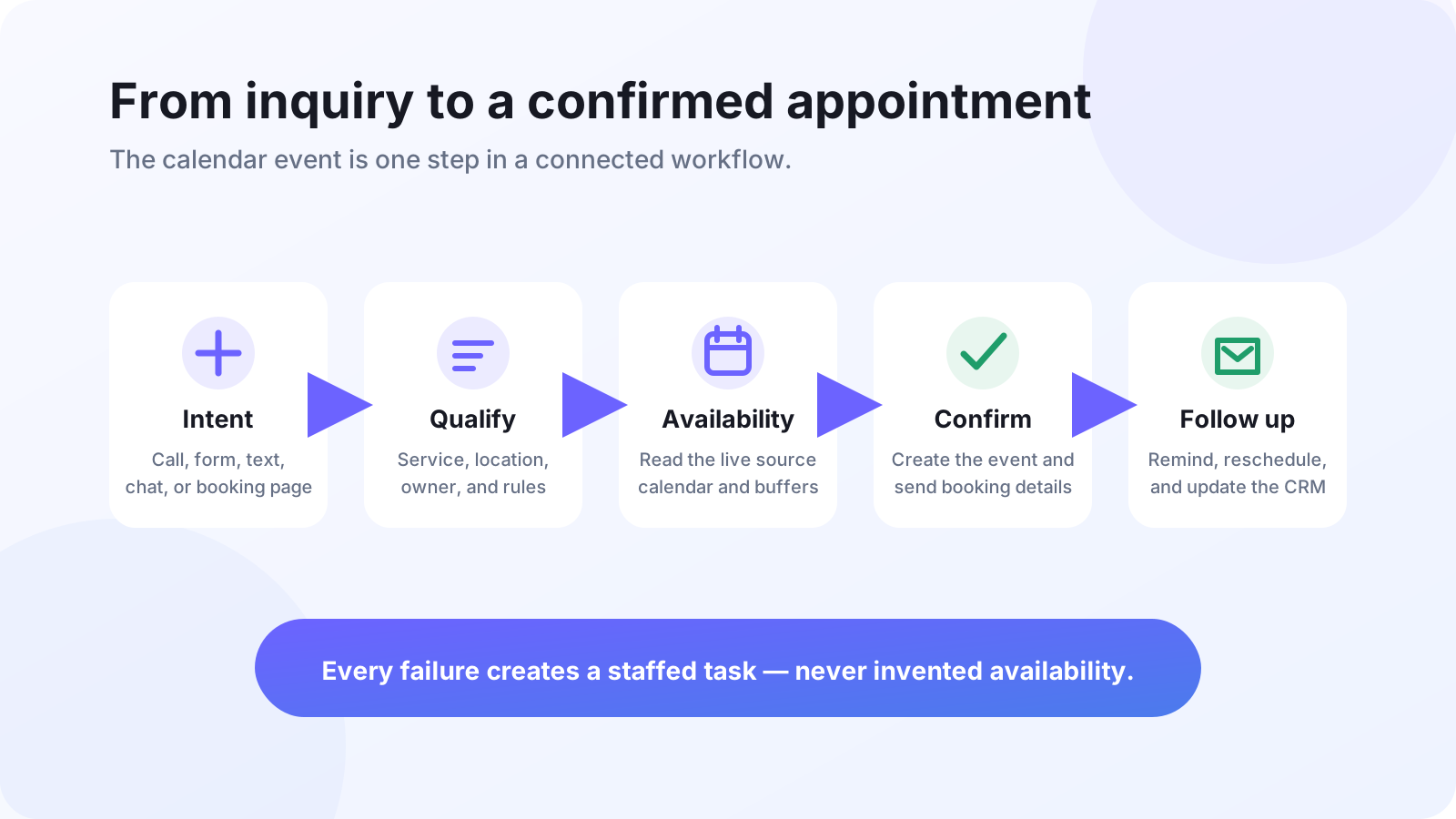
A useful booking workflow has six connected jobs:
- Capture intent: recognize that a caller, form lead, text reply, or site visitor wants to book.
- Qualify and route: collect only the information needed to choose the right service, location, or team member.
- Read availability: check the source calendar or scheduling system instead of relying on a copied list of slots.
- Create the booking: write the appointment and contact details to the system of record.
- Confirm and remind: tell the customer what was booked and send the right pre-appointment communication.
- Update the CRM: preserve source, campaign, conversation, and booking status for reporting and follow-up.
Three levels of booking automation
Level 1: A self-service booking page
The customer opens a page, sees available times, and chooses one. This is the simplest reliable setup for consultations, demos, and other appointments with predictable rules. Google Calendar's official appointment schedule documentation confirms that a booking page can expose available times, block conflicts, add the event to the calendar, and be shared as a link or embedded on a website. Its setup also supports scheduling windows, buffers, daily limits, forms, and reminders, depending on the account plan. See the Google Calendar appointment schedule guide.
Use this level when almost every visitor is qualified and the customer is comfortable choosing a time without speaking to the business first.
Level 2: Qualification and routing before the calendar
The customer answers a short set of questions before seeing a schedule. Their answers determine the service, location, representative, appointment length, or whether self-service booking is appropriate at all. Calendly describes the same pattern in its Routing Forms documentation: responses can route a visitor to an event type, an external URL, or a message.
Use this level when the wrong appointment creates real cost — for example, assigning an estimate outside the service area, placing a complex procedure into a short slot, or sending an enterprise lead to a general sales calendar.
Level 3: Conversational booking
A human or AI assistant handles qualification and scheduling inside a phone call, SMS thread, or chat. The customer does not have to leave the conversation to interpret a grid of times. The assistant reads live availability, offers valid choices, confirms the selection, and writes it back to the same source calendar.
Use this level when leads arrive through calls and messages, when questions usually precede a booking, or when the business wants to recover after-hours and missed-call demand. The adjacent guide on after-hours call answering explains why an assistant that can answer but cannot book is still a dead end.
How to design the workflow before choosing software
1. Define the bookable outcome
Start with one appointment type. Give it an owner, duration, location, success condition, and cancellation policy. “Book a consultation” is too vague if some consultations are virtual, some require a deposit, and some need a specialist.
2. Choose one source of truth for availability
Staff calendars, the CRM, and an industry scheduling system cannot all be authoritative. Decide which system owns the final slot and make every other tool read from or write to it. Google's Calendar API, for example, exposes a free/busy query and an event-insertion method; its documentation also notes that the authenticated user needs write access to the destination calendar. Review the official free/busy reference and event creation guide.
3. Write availability guardrails
Document working hours, minimum lead time, booking horizon, buffers, blackout dates, maximum daily volume, provider rules, and time-zone behavior. Test daylight-saving transitions and simultaneous booking attempts. “The calendar looked open” is not a sufficient acceptance test.
4. Ask only questions that change the route
Every required field adds friction. Keep a question only if its answer changes eligibility, appointment type, duration, location, provider, price, or preparation. Collect everything else after the slot is secured.
5. Define confirmations, reminders, and recovery
A confirmation should state the service, time, time zone, location, preparation, and reschedule path. Reminder timing should match the appointment: a same-day estimate and a procedure booked weeks ahead do not need the same sequence. Calendly's Workflows documentation lists triggers for bookings, reschedules, cancellations, event completion, and marked no-shows.
Separate operational communication from marketing. If the workflow adds automated promotional calls or texts, have counsel review the consent language and suppression process. The FCC treats texts as calls for TCPA purposes and requires prior express written consent for certain automated or prerecorded telemarketing to wireless numbers. See the FCC order. This is an implementation warning, not legal advice.
6. Preserve attribution and status
Store the original lead source, landing page, campaign parameters, booking method, appointment owner, and current status. A calendar tells you that time was reserved. The CRM should tell you which workflow produced it and what happened next. This is where lead follow-up automation and booking automation become one system rather than two disconnected tools.
7. Design the exception path
Decide what happens when no valid slot exists, the calendar API times out, the lead fails qualification, a requested service needs human review, or the customer changes the request mid-conversation. A safe workflow creates a staffed task with the conversation context; it does not invent availability or silently abandon the lead.
Common failure modes
- Link-only automation: every lead receives the same URL, even when intent and qualification differ.
- Stale availability: the assistant offers cached slots instead of checking the source calendar at confirmation time.
- No CRM write-back: the meeting exists, but source and conversation context are lost.
- Overlong intake: the booking form tries to complete onboarding before securing the appointment.
- No failure owner: integration errors disappear into logs instead of creating an actionable task.
- Reminder without recovery: the system sends notifications but has no reschedule or no-show path.
What to measure after launch
Use a small funnel that matches the workflow:
- booking intent captured;
- qualified for a bookable route;
- valid availability returned;
- appointment confirmed;
- appointment attended, canceled, or missed;
- qualified opportunity or customer created.
Segment by source, service, booking method, and failure reason. That shows whether the bottleneck is lead quality, calendar availability, form friction, integration reliability, or post-booking follow-up. Avoid optimizing only for the number of calendar events; an easy-to-book workflow can still produce low-quality appointments.
A practical starting point
Start with one high-intent workflow and run it end to end. A good first candidate is a new lead who asks for the earliest available consultation. Connect one calendar, define five or fewer routing questions, write the confirmation and exception paths, and test with staff before opening it to real leads.
For a deeper look at the product workflow, see AI appointment booking on your calendar. If leads first arrive through incomplete forms, pair it with the abandoned-form recovery guide. When you need to choose the customer experience, compare a booking link with conversational booking. When you are ready to implement, use the 27-test appointment-booking checklist to define ownership, acceptance tests, and rollout gates. When you are evaluating the surrounding stack, use the CRM integration checklist.
Continue exploring this topic
Appointment Booking Automation Checklist: 27 Tests Before Launch
Use this production-readiness checklist to define ownership, protect calendar integrity, test exceptions, instrument confirmed bookings, and roll out without risking the front desk.
ReadBest Appointment Booking Automation for Service Businesses: A Buyer's Guide
Compare booking pages, team-routing tools, API-first platforms, vertical schedulers, and conversational booking against the workflow your business actually needs.
ReadAppointment Booking Revenue Scenario Calculator
Model an appointment-booking workflow with your own eligible leads, lead-to-paying-customer rates, and first-purchase revenue—without assuming a vendor uplift.
Read