 Legion AI
By Casey Morgan Legion AI editorial pen name
Abandoned Form Follow-Up: Recover Leads Without Losing Trust
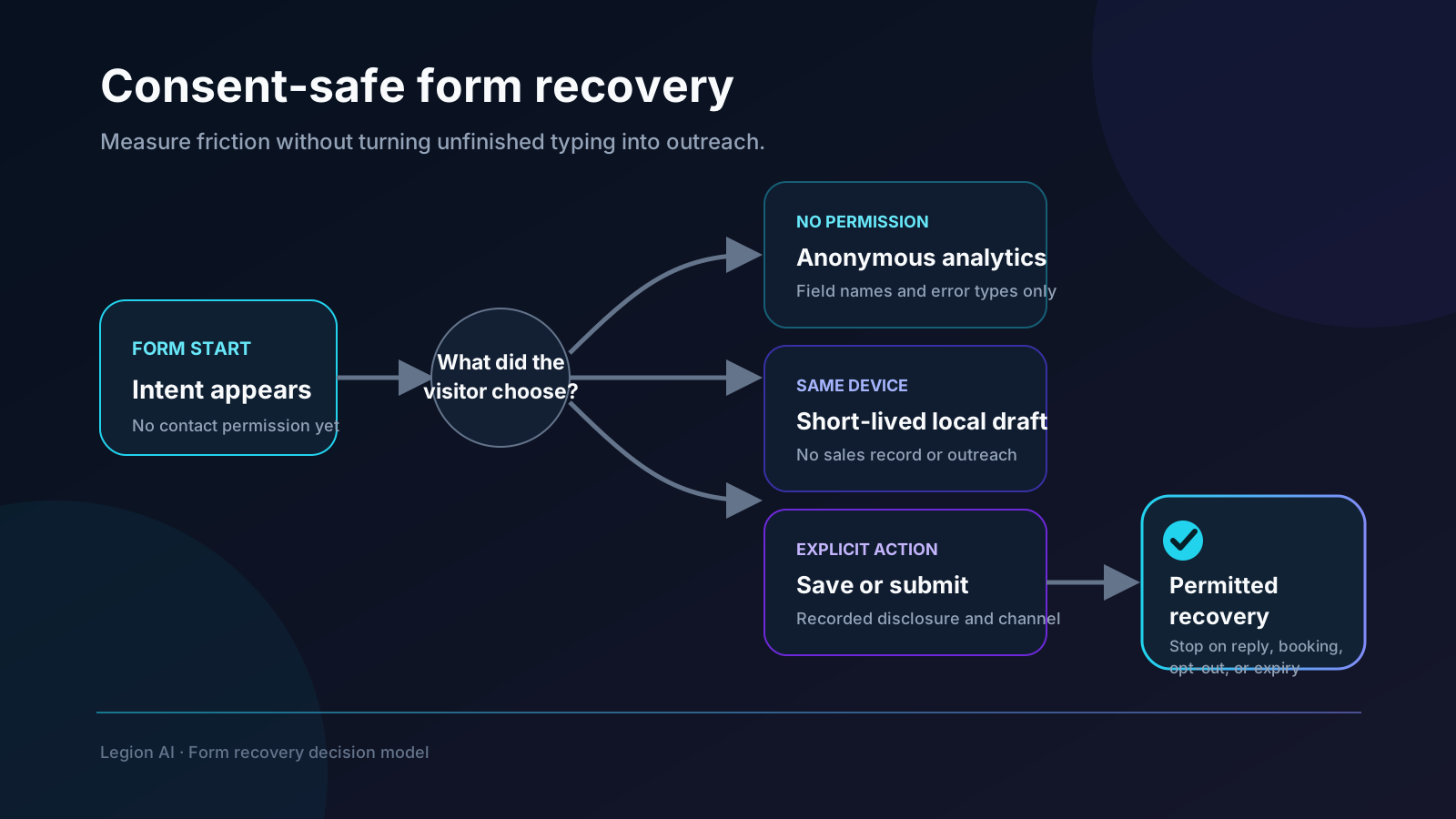
An unfinished form is evidence of friction, not permission to contact someone. The safest recovery workflow first helps the visitor continue, then follows up only when the person has completed a clear consent step or submitted a valid request. That distinction makes the automation more useful and avoids turning a conversion problem into a trust problem.
This playbook covers three legitimate jobs: measuring where a form loses people without recording field values, preserving a draft for the visitor, and reconnecting after an explicit “save and continue” or submitted inquiry. It does not assume that text typed into an unfinished field is a lead.
Start by removing the reason people abandon
Recovery is a second-best outcome. Before adding messages, inspect the form on mobile and remove work that does not change the route. Ask whether every required field changes eligibility, service, price, location, owner, or preparation. Move optional profile questions after the request is submitted or the appointment is booked.
Instrument the form with value-free events such as:
- form_view: the form became visible;
- form_start: the visitor interacted with a field;
- form_step_complete: a named step passed validation;
- form_error: a categorized validation or server error occurred;
- form_submit: the server accepted the request;
- booking_confirmed: the scheduling system created the appointment.
Send field names, step names, and error categories—not names, email addresses, phone numbers, free text, health details, or the values a person typed. This is enough to find friction without copying personal data into an analytics platform.
Choose one of three recovery models
1. Resume on the same device
Preserve the draft in browser storage so a refresh or accidental navigation does not erase the visitor's work. Keep the retention short, exclude sensitive fields, and provide a visible “clear draft” action. This improves continuity without sending an incomplete identity to the sales team.
2. Explicit save and continue
Offer a button such as “Email me a secure link to finish later.” Explain exactly what will be sent and whether any other follow-up is included. Create the server-side draft only after that action, use an opaque expiring token in the resume URL, and never put form answers or contact details in the URL.
3. Follow up after a valid submission
A visitor may submit an inquiry but leave before choosing an appointment. That is a cleaner operational recovery case: the business has the submitted request, a disclosed contact path, and a known next step. The workflow can answer the question, qualify the request, or return the person to live availability.
Keep operational help separate from marketing. The FCC's rules for automated or prerecorded telemarketing calls and texts include specific consent and disclosure requirements; the mere presence of a phone number should not be treated as universal permission for every channel or message. Review the FCC's official consent guidance with qualified counsel for the workflow and jurisdictions you use.
Build the recovery record deliberately
A server-side draft or submitted inquiry needs a small, auditable state model:
- a random internal record ID and expiring resume token;
- the consent action, disclosure version, timestamp, source page, and permitted channels;
- the minimum fields required to resume or route the request;
- status: draft, submitted, booked, expired, opted out, or deleted;
- message attempts and the event that stopped the workflow;
- an owner for failed delivery or a customer reply.
Do not keep partial data indefinitely “in case sales needs it.” The FTC recommends collecting only information the business needs, defining retention, limiting access, and disposing of data when the business reason ends. The FTC guide for protecting personal information is a useful baseline for the data inventory and retention review.
Write the sequence around the visitor's action
A recovery message should describe the action the person knowingly took. For a save-and-continue request: “Here is the secure link you asked for.” For a submitted inquiry without a booking: “We received your request; would you like help choosing a time?” Avoid surveillance language and invented urgency.
Start with one message in the channel the visitor selected. Add a second touch only when the disclosure and business need support it. Every sequence needs stop conditions for submission, confirmed booking, reply, human takeover, opt-out, invalid contact data, token expiry, and deletion.
Acceptance tests before launch
- A form start with no consent creates analytics events but no contact record or outreach.
- Refreshing the page restores only the allowed same-device draft fields.
- “Clear draft” removes the saved state and it does not reappear.
- A save-and-continue link expires, is single-purpose, and contains no personal data.
- Analytics payloads contain field names and error categories but never field values.
- A submitted inquiry follows the selected channel and the recorded disclosure.
- A reply, booking, opt-out, or human takeover stops every queued message.
- Expired and unneeded drafts are deleted according to the written retention rule.
- A failed message or scheduling integration creates one staffed task with enough context to act.
Measure recovery without rewarding spam
Report form start-to-submit rate, validation failure rate by field, save-and-continue acceptance, resume completion, submitted-inquiry-to-booking rate, confirmed bookings, opt-outs, complaints, and downstream qualification. Compare the recovery cohort with the normal path. More messages are not a win if qualification falls or opt-outs rise.
Once the inquiry is valid, connect it to the full appointment booking automation workflow. Use the 27-test implementation checklist to verify confirmation, idempotency, attribution, and lifecycle recovery, and see how Legion handles the surrounding follow-up on the AI lead follow-up page and the booking step on the appointment booking product page.
Continue exploring this topic
Appointment Booking Automation Checklist: 27 Tests Before Launch
Use this production-readiness checklist to define ownership, protect calendar integrity, test exceptions, instrument confirmed bookings, and roll out without risking the front desk.
ReadBest Appointment Booking Automation for Service Businesses: A Buyer's Guide
Compare booking pages, team-routing tools, API-first platforms, vertical schedulers, and conversational booking against the workflow your business actually needs.
ReadAppointment Booking Revenue Scenario Calculator
Model an appointment-booking workflow with your own eligible leads, lead-to-paying-customer rates, and first-purchase revenue—without assuming a vendor uplift.
Read