 Legion AI
By Casey Morgan Legion AI editorial pen name
Best Appointment Booking Automation for Service Businesses: A Buyer's Guide
The best appointment booking automation is the least complex system that can produce a valid appointment for your real customer journey. A solo consultant with one calendar, a med spa routing treatments to providers, and a home-services company scheduling estimates from phone calls should not buy the same workflow.
This guide compares five buying paths rather than declaring one universal winner. Prices and plan packaging change; operational fit is more durable. Use the scorecard and demo tests below with current vendor documentation and a trial account before signing a contract.
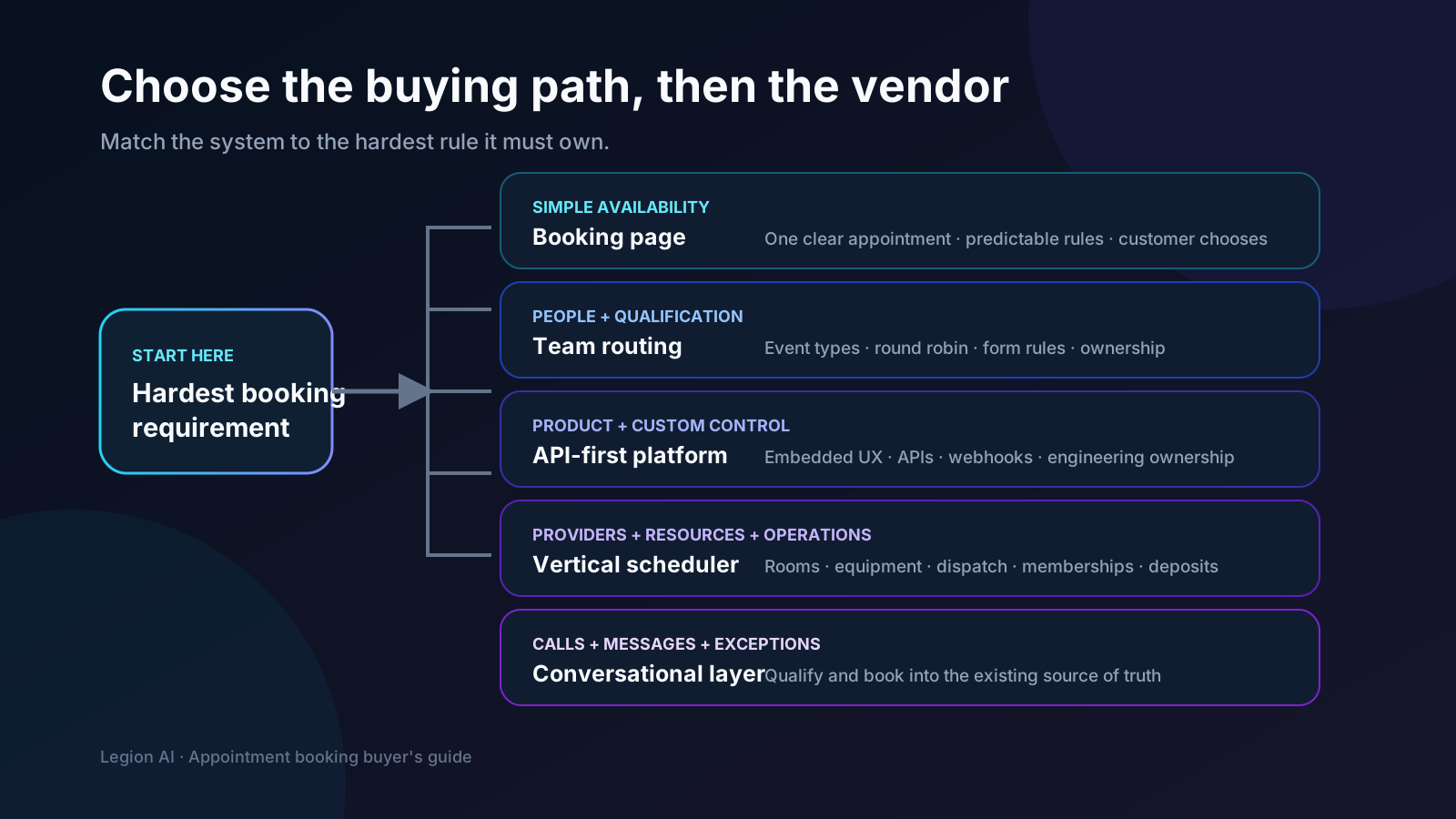
The short list by workflow
| Buying path | Best fit | Validate before buying |
|---|---|---|
| Google Calendar appointment schedules | Straightforward one-person or small-team booking already centered on Google Calendar | Plan eligibility, multiple schedules, reminders, payments, and team routing |
| Calendly | Professional services, demos, and teams that need event types or form-based routing | Routing, workflows, integrations, administration, and required plan tier |
| Cal.com | Teams building scheduling into a product or custom workflow | Implementation ownership, API scopes, routing, hosting model, and support |
| Vertical scheduling system | Businesses where providers, rooms, services, memberships, deposits, or dispatch rules drive operations | Industry workflow depth, data export, calendar API, payments, and multi-location controls |
| Conversational booking layer | Phone, SMS, chat, or DM demand that needs qualification and exception handling | Source-calendar integrity, approved answers, handoffs, transcripts, and failure recovery |
Path 1: Google Calendar appointment schedules
Start here when the calendar is already the operating system and the appointment rules are simple. Google documents a shareable or embeddable booking page that checks calendar conflicts and adds accepted appointments to Calendar. Some subscriptions add features such as reminders and paid appointments. Review the current Google Calendar appointment schedules documentation for account-specific availability.
The attraction is low system sprawl. The risk is stretching a simple calendar page into provider, resource, dispatch, or qualification logic it was not selected to own. Test the hardest routing case before choosing it for the entire business.
Path 2: Calendly for polished scheduling and team routing
Calendly is a strong candidate when the core job is publishing event types, coordinating professional appointments, and routing visitors to people or destinations. Its current Routing Forms documentation describes rules based on form answers, destinations for event types, external URLs or messages, and a fallback route. See the official Routing Forms guide.
Confirm the plan tier for every required feature and integration. A demo that shows a round-robin event but skips your disqualification, ownership, attribution, and failure cases has not proven the workflow.
Path 3: Cal.com for API-first or product scheduling
Cal.com belongs on the shortlist when scheduling must live inside a product or custom application. Its current API documentation covers bookings, schedules, slots, routing forms, workflows, webhooks, OAuth, and scoped organization permissions. The routing-form API and OAuth scope reference show the level of control available.
More control creates more ownership. Price the engineering, monitoring, credential management, support, and upgrade work—not only the subscription. Ask who will diagnose a failed booking outside business hours.
Path 4: an industry system as the source of truth
A vertical scheduler is usually the safer foundation when the appointment affects rooms, equipment, provider credentials, chair time, dispatch zones, memberships, packages, deposits, or industry records. The system closest to daily operations should normally own final availability and appointment status.
Evaluate the booking surface separately from the operating database. A strong back-office scheduler may still need a better intake, routing, or conversational layer. Require documented APIs or supported integrations, export access, stable event identifiers, and an unambiguous failure path before adding automation around it.
Path 5: a conversational booking layer
Conversational booking earns its complexity when intent arrives by phone or message, customers ask questions before choosing, or answers change service, provider, duration, location, or eligibility. It should read and write the existing source calendar, not create a competing schedule.
This is the layer Legion occupies: lead response, qualification, live availability, booking, confirmation, and follow-up across calls and messages. The comparison of booking links versus conversational booking helps determine when that layer is justified.
Use a ten-part buying scorecard
- Source of truth: Which system owns the slot and final status?
- Availability: Can it express every provider, resource, buffer, lead-time, and location rule?
- Qualification: Do answers change the route without forcing irrelevant questions?
- Channels: Can customers finish in the web, phone, text, chat, or DM path where intent starts?
- Lifecycle: Are confirmation, reschedule, cancellation, reminders, and no-show states coherent?
- Exceptions: Does every rejected or ambiguous request receive an owned next action?
- Integrations: Are the CRM, payments, calendar, and reporting connections supported and observable?
- Attribution: Can source, campaign, landing page, and CTA context survive the handoff?
- Administration: Can non-engineers safely change hours, owners, services, and copy?
- Exit: Can you export customers, appointments, statuses, and identifiers without losing history?
The vendor demo script
Send vendors one scenario in advance and ask them to perform it live:
- A new lead arrives from a campaign with a specific service request and preferred location.
- One answer makes the lead ineligible; show the alternative path.
- A valid lead chooses a slot while another user takes it first; show recovery.
- The calendar API times out; show what the customer and staff see.
- The appointment is rescheduled and then canceled; show the record and messages.
- Show how campaign and CTA context appears in reporting.
- Export the lead, appointment, status history, and external identifiers.
Score the observed workflow, not the slide deck. Then run the selected system through the appointment-booking implementation checklist before production traffic.
Red flags that should pause the purchase
- The vendor confirms a slot before the source calendar accepts it.
- Critical routing or integration features appear only after a plan upgrade not included in the quote.
- Failure handling means “check the logs” and has no staff owner or customer message.
- The system cannot distinguish a Calendly click, a requested time, and a confirmed event.
- Attribution or sensitive intake data must be placed into uncontrolled URLs.
- There is no practical export or stable identifier for reconciling systems.
- Changing providers, hours, or services requires vendor professional services every time.
Our recommendation by business type
- Solo and simple professional services: start with Google Calendar or a direct booking page.
- B2B sales and routed consultations: shortlist Calendly and Cal.com based on routing and implementation ownership.
- Med spas, salons, and fitness: keep the operational or membership scheduler authoritative; add a better intake or conversation layer where demand leaks.
- Home services: keep dispatch and field-service rules authoritative; use conversational booking for calls, estimates, and after-hours exceptions.
- Software platforms: evaluate Cal.com or another API-first foundation before building scheduling primitives yourself.
Start with one appointment type and the simplest path that passes the hard cases. You can add channels later; recovering from two systems that both believe they own availability is much harder.
Review Legion's appointment-booking workflow and pricing. Then use the booking automation revenue scenario calculator to test the shortlisted system against your own lead and first-purchase assumptions.
Continue exploring this topic
Appointment Booking Automation Checklist: 27 Tests Before Launch
Use this production-readiness checklist to define ownership, protect calendar integrity, test exceptions, instrument confirmed bookings, and roll out without risking the front desk.
ReadAppointment Booking Revenue Scenario Calculator
Model an appointment-booking workflow with your own eligible leads, lead-to-paying-customer rates, and first-purchase revenue—without assuming a vendor uplift.
ReadAfter-Hours Call Answering: How SMBs Can Stop Missing Nighttime Leads
A practical runbook for routing urgent calls, booking valid appointments, answering approved questions, and handing exceptions to the morning team.
Read