 Legion AI
By Casey Morgan Legion AI editorial pen name
Booking Link vs. Conversational Booking: Which Workflow Fits Your Business?
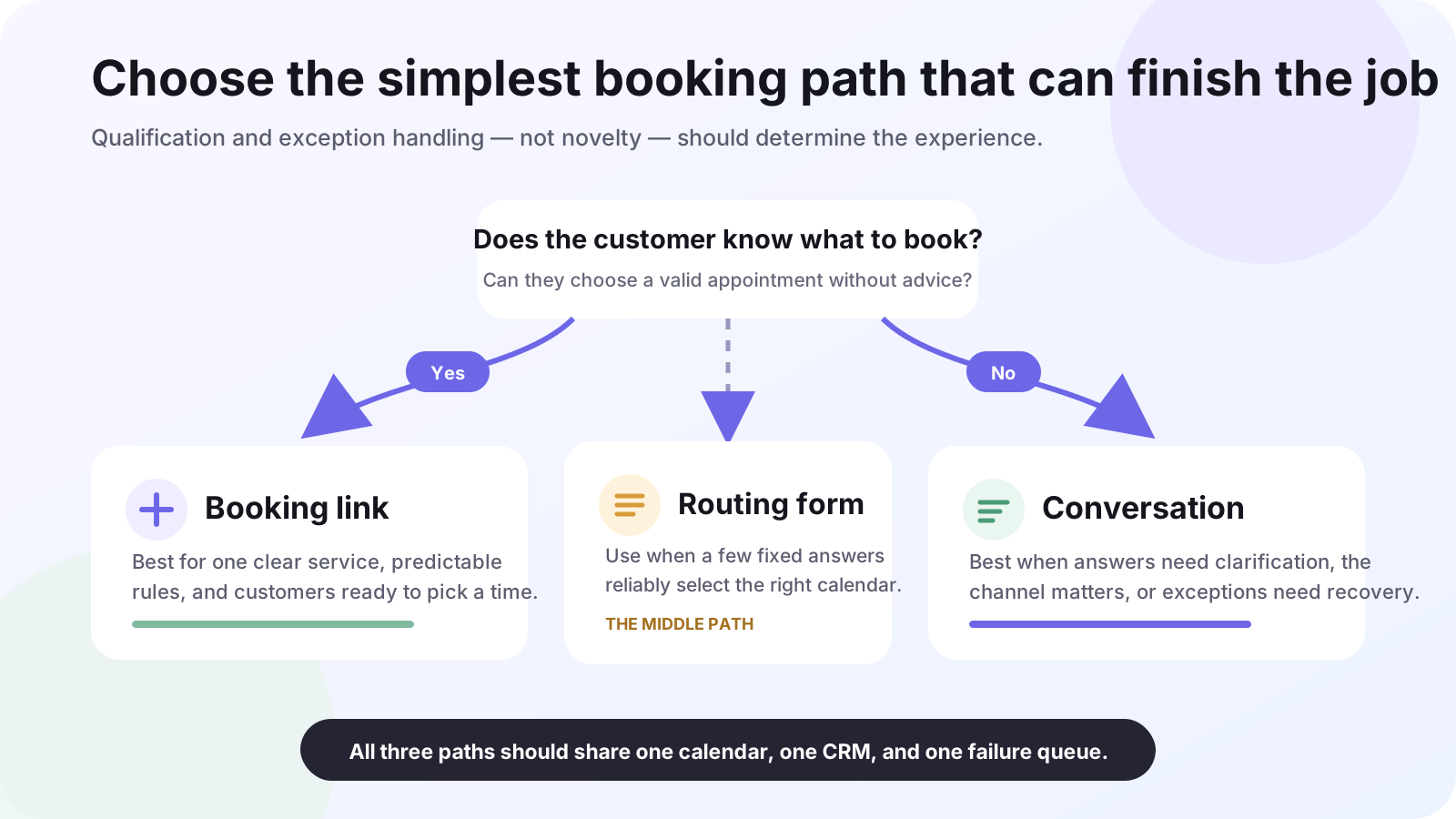
A booking link is usually the best scheduling tool when the customer already knows what they want and the appointment rules are simple. Conversational booking is better when the business has to ask questions, route the request, explain options, or handle exceptions before showing a time.
This is not a contest between old and new software. They solve different parts of the scheduling problem, and many service businesses should use both. The useful question is: how much decision-making has to happen between “I want an appointment” and a valid calendar event?
The short comparison
| Decision factor | Booking link | Conversational booking |
|---|---|---|
| Best starting intent | Customer knows the service and wants a time | Customer has questions or an ambiguous request |
| Qualification | Short form or routing form | Adaptive questions based on earlier answers |
| Customer effort | Open a page and interpret the available slots | Stay in the call, text, or chat |
| Exceptions | Usually redirects or displays a message | Can clarify, offer another route, or create a staffed task |
| Operational complexity | Lower | Higher; requires conversation and fallback design |
| Strongest use case | Standard demos, consultations, and classes | Phone leads, estimates, multi-service intake, and after-hours demand |
When a booking link is the better choice
Booking links are easy to understand, easy to test, and inexpensive to operate. They give the customer direct control over the time and create a repeatable path for staff. Google Calendar's appointment schedules, for example, can expose availability on a booking page, check calendars for conflicts, and apply rules such as a scheduling window, buffer time, and maximum bookings per day. See Google's official appointment schedule setup guide.
Prefer a booking link when all or most of these are true:
- the customer already selected a specific service or appointment type;
- the same short set of questions works for nearly everyone;
- availability rules fit cleanly into one scheduling system;
- the customer can choose a slot without advice;
- an unusual request can safely be redirected to a contact form or staff member.
A demo request from a product page is a good example. The visitor knows the next step, the meeting length is fixed, and there is little value in holding a conversation before showing the calendar.
Where booking links start to break down
A link becomes less effective when it pushes business logic onto the customer. Someone asking for a home-service estimate may not know which appointment type matches the job. A new patient may need the right provider and duration. A caller may be driving, using a landline, or simply unwilling to leave the conversation to open a page.
Routing forms extend what a link can handle. Calendly documents rules that use form responses to send a visitor to an event type, an external URL, or a custom message. That is useful when the decision tree is short and known in advance. Review the official Routing Forms guide.
The limit is not the number of form fields. It is whether a fixed form can resolve the request without making a qualified customer guess. If the workflow needs clarification, explanation, or recovery, adding more required questions usually transfers work rather than removing it.
When conversational booking earns the extra complexity
Conversational booking keeps the customer inside the channel where intent appeared. A receptionist or AI assistant can ask one question, use the answer to choose the next question, check live availability, and confirm the result. It can also explain why a requested time or service is unavailable and create a task when the request needs human judgment.
That additional capability is useful when:
- calls and text messages are important lead sources;
- service, location, eligibility, urgency, or provider changes the route;
- customers commonly ask questions before committing;
- after-hours intent would otherwise become voicemail;
- the business needs a controlled exception path rather than a generic rejection.
The tradeoff is operational. A conversational workflow needs approved answers, qualification rules, calendar access, failure handling, transcripts, and a clear handoff owner. It must never invent a slot or hide an integration failure. The broader appointment booking automation guide walks through those requirements in order.
A practical five-question decision
- Does the customer know which appointment to choose? If yes, start with a link. If not, add routing or a conversation.
- Do answers change the service, owner, duration, or location? If the branches are few and fixed, a routing form may be enough. If they require clarification, use a conversation.
- Where does intent arrive? A web visitor can use a page naturally. A phone or SMS lead may be better served without a channel switch.
- What happens to an exception? If a message and staff contact are acceptable, a link can work. If the customer needs an alternative now, use a conversational path.
- Can the team maintain the workflow? Do not add AI or routing complexity without an owner for rules, integrations, transcripts, and failed bookings.
The hybrid model is often the right answer
A hybrid workflow uses the simplest successful path for each source. Product-page visitors can receive a direct booking link. Calls and texts can stay conversational. A short routing form can handle paid-traffic campaigns with two or three known branches. Every path writes to the same source calendar and CRM.
The important part is shared governance: one set of availability rules, consistent appointment types, the same attribution fields, and one failure queue. Otherwise the business has several booking experiences that disagree about what can actually be scheduled. The CRM integration checklist covers the surrounding systems, while the guide to after-hours call answering shows where a conversational path creates the most leverage. Once the path is chosen, use the appointment-booking implementation checklist to test calendar integrity, exceptions, analytics, and rollback before launch. When you are ready to shortlist software, use the appointment-booking buyer's guide.
How Legion approaches the choice
Legion does not need to replace a booking link that already fits the job. The goal is to connect lead capture, qualification, live availability, confirmation, and CRM follow-up where a static link leaves gaps. See the appointment-booking workflow for the product-level view.
Continue exploring this topic
Appointment Booking Automation Checklist: 27 Tests Before Launch
Use this production-readiness checklist to define ownership, protect calendar integrity, test exceptions, instrument confirmed bookings, and roll out without risking the front desk.
ReadBest Appointment Booking Automation for Service Businesses: A Buyer's Guide
Compare booking pages, team-routing tools, API-first platforms, vertical schedulers, and conversational booking against the workflow your business actually needs.
ReadAppointment Booking Revenue Scenario Calculator
Model an appointment-booking workflow with your own eligible leads, lead-to-paying-customer rates, and first-purchase revenue—without assuming a vendor uplift.
Read