 Legion AI
By Casey Morgan Legion AI editorial pen name
After-Hours Call Answering: How SMBs Can Stop Missing Nighttime Leads
After-hours call answering works when it resolves the caller's next step, not merely when it replaces voicemail. For a service business, that usually means identifying the request, applying an approved urgency rule, booking a valid slot, or transferring a concise task to the person on call.
The hard part is operational design. An assistant that answers every call but invents availability, mishandles an urgent request, or promises a service the business does not provide creates more work for the morning team. Use this playbook to define the boundaries before routing live calls.
Define what “after hours” means operationally
Write a coverage schedule that includes normal closing time, weekends, holidays, staff meetings, temporary closures, and the transition back to the front desk. Decide whether the assistant handles overflow during open hours as well as fully unattended periods.
Name an owner for the schedule. If nobody updates holiday hours or the on-call roster, the workflow will eventually follow an obsolete rule while sounding completely confident.
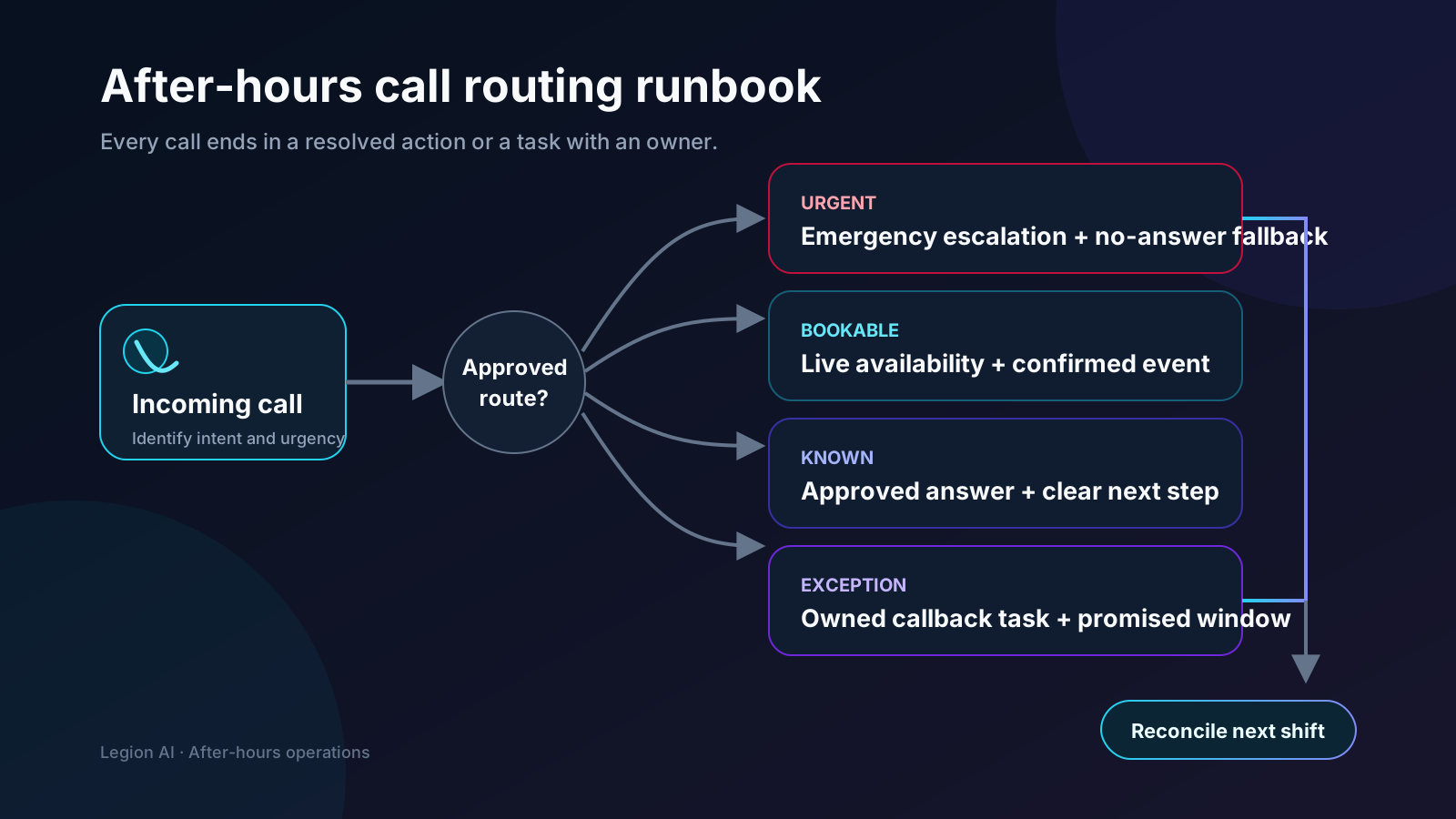
Use four explicit call outcomes
1. Emergency or safety escalation
Define the phrases and facts that require an immediate handoff, the number or role that receives it, and what happens when that person does not answer. Keep this rule narrow and business-specific. The assistant should not diagnose risk or improvise instructions outside approved language.
2. Confirmed appointment
For a bookable request, collect only the information needed to select the service, location, duration, and provider. Read live availability, offer valid choices, re-check the chosen slot, and say “confirmed” only after the source calendar accepts the event.
3. Approved information
Maintain a small answer set for hours, service area, preparation, location, and other stable questions. Every answer needs an owner and review date. Pricing, eligibility, medical, legal, or safety questions should follow the business's approved boundary rather than a generated best guess.
4. Staffed callback
When the request needs judgment, create one task containing the caller's name, preferred contact method, reason for calling, urgency, relevant transcript excerpt, and promised response window. Assign it to a real queue and confirm the expectation to the caller.
Design booking before writing the script
The calendar rules are the product. Document working hours, minimum notice, service areas, provider skills, buffers, appointment length, blackout dates, and maximum capacity. Choose one system of record and prevent parallel staff booking from creating stale offers.
The appointment booking automation guide explains the complete workflow. Before routing real calls, run the 27-test implementation checklist against simultaneous bookings, provider failures, time zones, reschedules, cancellations, and duplicate events.
Write a short, honest opening
Identify the business and the assistant, explain the available actions, and let the caller ask naturally. For example: “Thanks for calling Northside Heating. I'm the automated after-hours assistant. I can help schedule service, answer approved questions, or reach the on-call team for an urgent issue. What do you need help with?”
The exact disclosure and consent requirements depend on the channel, purpose, location, and technology. Have qualified counsel review the production script and recording policy. Operational clarity is useful regardless: callers should understand who they reached and whether a human is available.
Close the loop before the call ends
A booked caller should hear the service, date, time, time zone, location, provider when relevant, and preparation. Send the same details through the permitted confirmation channel with a reschedule or cancellation path. A callback caller should hear who owns the request and when to expect a response.
If the calendar or messaging provider is unavailable, do not pretend the action succeeded. Explain that the request is pending, create an owned task, and send a confirmation only after the downstream system recovers.
Acceptance tests for an unattended shift
- A routine request books one valid slot and creates one confirmation.
- Two callers selecting the same slot cannot both receive a confirmation.
- An out-of-area or unsupported request follows the approved alternative path.
- Each emergency phrase reaches the correct on-call path, including the no-answer fallback.
- A calendar timeout creates no false booking and one actionable staff task.
- Pricing or policy questions outside the answer set do not produce invented answers.
- A caller asking for a person can reach the defined human or callback path.
- An opt-out, cancellation, or human takeover stops obsolete automated messages.
- The morning team can reconcile calls, events, failures, and callbacks without reading every transcript.
Measure outcomes, not call volume
Track answer success, caller intent, qualified booking rate, confirmed appointments, emergency transfers, callback completion, integration failures, cancellations, attendance, qualification, and complaints. Compare after-hours appointments with business-hours appointments on downstream quality rather than assuming every calendar event has equal value.
Review failure reasons weekly during rollout. If callers repeatedly need an unsupported service, staff callback, or unavailable time, improve the operating rule before expanding traffic. The product view on AI appointment booking shows how the same rules connect qualification, live availability, confirmation, and follow-up.
Continue exploring this topic
Appointment Booking Automation Checklist: 27 Tests Before Launch
Use this production-readiness checklist to define ownership, protect calendar integrity, test exceptions, instrument confirmed bookings, and roll out without risking the front desk.
ReadBest Appointment Booking Automation for Service Businesses: A Buyer's Guide
Compare booking pages, team-routing tools, API-first platforms, vertical schedulers, and conversational booking against the workflow your business actually needs.
ReadAppointment Booking Revenue Scenario Calculator
Model an appointment-booking workflow with your own eligible leads, lead-to-paying-customer rates, and first-purchase revenue—without assuming a vendor uplift.
Read