 Legion AI
By Casey Morgan Legion AI editorial pen name
Appointment Booking Automation Checklist: 27 Tests Before Launch
Appointment booking automation is ready to launch when the team can explain what it will book, prove that it cannot invent or double-book a slot, and recover cleanly when an integration fails. A polished happy-path demo is not enough. The real test is what happens with a stale calendar, an ineligible lead, a time-zone change, or a customer who reschedules twice.
Use this 27-point checklist as a production-readiness review. Copy it into the implementation ticket, assign an owner to every section, and attach evidence for every checked item. If you are still deciding what kind of workflow to build, start with the broader appointment booking automation guide and the comparison of booking links and conversational booking.
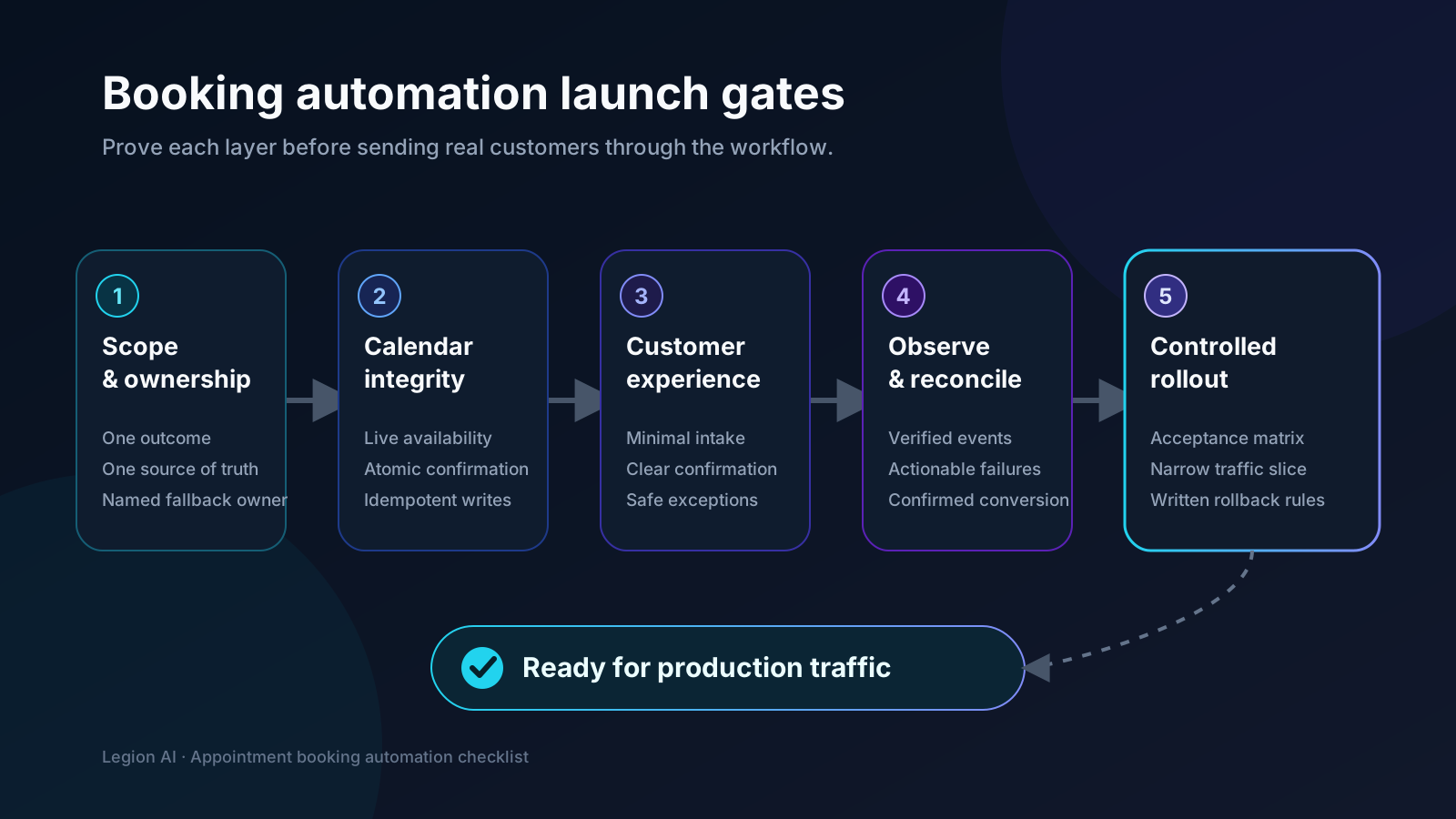
Gate 1: scope and ownership
Start with one bookable outcome, not every calendar in the company. A narrow workflow makes routing decisions explicit and gives the team a clean control group during rollout.
- Name the exact appointment. Record its duration, location, delivery mode, preparation, cancellation policy, and definition of a successful booking.
- Choose the system of record. Identify the one calendar or scheduling platform that owns final availability and appointment status. Other systems may mirror it, but they do not get to disagree with it.
- Assign a business owner and a technical owner. The business owner approves eligibility and customer language. The technical owner owns credentials, integration health, and incident response.
- Define the manual fallback. Specify who receives an exception, which context they receive, and how quickly they are expected to respond. “Send it to staff” is not an operational path.
Gate 2: calendar integrity and routing rules
Availability must be read from the authoritative calendar at request time and checked again when the customer confirms. Google Calendar exposes separate free/busy and event-creation operations, which is a useful model even when another scheduling platform is the source of truth. Review the official free/busy reference and event creation guide.
- Document every availability constraint. Include working hours, booking horizon, minimum notice, buffers, blackout dates, daily limits, provider rules, rooms, equipment, and service areas.
- Make qualification answers change something. Keep a required question only when it changes eligibility, service, duration, location, provider, preparation, or escalation.
- Handle time zones explicitly. Store canonical timestamps, show the customer-facing zone in the confirmation, and test daylight-saving transitions plus customers outside the business's zone.
- Re-check before writing. Treat a slot shown to the customer as provisional until the source system accepts the booking. If the slot disappeared, apologize and offer fresh availability.
- Make booking requests idempotent. A retry, double-click, or repeated webhook must not create a second appointment. Persist the provider's event identifier and reject duplicate work.
Gate 3: customer experience and lifecycle
The customer should always know whether the appointment exists. Avoid optimistic wording such as “you're booked” until the scheduling system has returned a confirmed event.
- Use an honest channel-appropriate opening. Identify the business, disclose automation when required, explain what the workflow can do, and offer a human path.
- Keep the intake minimal. Ask the highest-routing-value questions first and collect optional profile data after the slot is secured.
- Confirm the complete appointment. State service, date, time, time zone, location or meeting link, provider when relevant, preparation, and reschedule/cancel path.
- Design a safe refusal. Ineligible, unsupported, urgent, or ambiguous requests should receive a useful next action without exposing internal rules or fabricating an answer.
- Define reminders by appointment type. Choose timing and channel based on lead time and preparation needs instead of applying one generic sequence to everything.
- Keep reschedules attached to the original booking. Update status and event identifiers so a moved appointment does not appear as a new acquisition conversion.
- Separate cancellation from no-show. They imply different customer intent and need different recovery paths, owners, and reporting.
- Stop messages when the state changes. Cancellation, reschedule, attendance, opt-out, or a human takeover must suppress obsolete reminders and follow-up.
If promotional calls or texts are mixed into operational booking messages, have qualified counsel review consent, disclosure, and suppression requirements for the jurisdictions and channels you use.
Gate 4: integrations, observability, and measurement
A workflow is observable when staff can answer three questions without reading raw logs: Is the scheduling provider healthy? Which booking failed? What should happen next?
- Use least-privilege credentials. Grant only the calendars and actions the workflow needs, keep secrets server-side, and document credential ownership and expiry.
- Verify inbound events. Authenticate webhooks, acknowledge them quickly, deduplicate retries, and process longer work asynchronously. Calendly's developer documentation distinguishes scheduled, canceled, and routing-form events; map each subscribed event to an explicit state transition in your system. See the official webhook subscription guide.
- Create an actionable failure queue. Include contact, requested appointment, failure reason, last successful step, retry status, and owner. Alert on sustained error rate, not every transient retry.
- Reconcile systems daily during rollout. Compare confirmed events in the scheduling system with booking records in the CRM and investigate missing, duplicated, or stale statuses.
- Track intent and confirmation separately. A click, form start, or “yes” in a conversation is not a booking. Count a conversion only after the source system confirms the event.
- Preserve acquisition and workflow context. Carry source, medium, campaign, landing page, CTA placement, booking method, service, and location into a joinable record without putting secrets or sensitive answers in URLs.
- Measure downstream quality. Report qualification, attendance, opportunity, and customer outcomes alongside booking rate so easier scheduling does not hide lower-quality appointments.
Gate 5: controlled launch
- Run the acceptance matrix below. Attach screenshots or event IDs for each result and retest whenever availability, routing, provider permissions, or lifecycle messaging changes.
- Release to a narrow slice first. Start with staff traffic, then a limited source, schedule, location, or appointment type. Keep the manual path available until reconciliation is clean.
- Write rollback criteria before launch. Pause automation for duplicate bookings, invented availability, unhandled urgent requests, sustained provider errors, or messaging that continues after an opt-out or cancellation.
The minimum acceptance-test matrix
| Test | Expected result | Evidence |
|---|---|---|
| Valid happy path | One correct event, CRM record, confirmation, and confirmed-booking event | Event IDs in all systems |
| Two customers choose one slot | One succeeds; the other receives current alternatives | Calendar and conversation logs |
| Provider API times out | No false confirmation; bounded retry or staffed fallback is created | Failure queue record |
| Duplicate submit or webhook | One booking and one acquisition conversion | Idempotency and analytics records |
| Ineligible or out-of-area lead | No slot shown; approved alternative or human route is offered | Routing decision |
| DST or cross-zone booking | Calendar and customer confirmation show the intended instant and zone | Event and confirmation |
| Reschedule, cancellation, no-show | Correct state, suppression, attribution, and recovery path for each | Lifecycle event timeline |
| Human takeover or opt-out | Automation stops immediately and context transfers once | Message and ownership logs |
A rollout that protects the front desk
Run the first week in shadow mode: let the workflow calculate the route and proposed slots without creating events, then compare its decisions with staff. Next, allow real bookings for one controlled source or appointment type and reconcile every event daily. Expand only after duplicate count is zero, failure ownership is working, and booking quality is at least comparable to the manual path.
This keeps the decision reversible. The team can isolate whether a problem lives in lead qualification, availability, conversation design, the calendar integration, lifecycle messaging, or attribution instead of debugging the entire customer journey at once.
Turn the checklist into a real workflow
The checklist is deliberately vendor-neutral. Apply it to one high-intent appointment and one source of truth, then evaluate software against the requirements you documented. Use the appointment-booking buyer's guide to compare the main platform paths. See how Legion connects qualification, live availability, booking, and follow-up on the AI appointment-booking page, or map your workflow with us.
Continue exploring this topic
Best Appointment Booking Automation for Service Businesses: A Buyer's Guide
Compare booking pages, team-routing tools, API-first platforms, vertical schedulers, and conversational booking against the workflow your business actually needs.
ReadAppointment Booking Revenue Scenario Calculator
Model an appointment-booking workflow with your own eligible leads, lead-to-paying-customer rates, and first-purchase revenue—without assuming a vendor uplift.
ReadAfter-Hours Call Answering: How SMBs Can Stop Missing Nighttime Leads
A practical runbook for routing urgent calls, booking valid appointments, answering approved questions, and handing exceptions to the morning team.
Read