 Legion AI
By Casey Morgan Legion AI editorial pen name
Agentic CRM Implementation: A 30-Day Pilot Plan for Small Businesses
An agentic CRM is useful only when it improves a real operating workflow. That is why the right first project is not “turn on AI everywhere.” It is one repeatable handoff: for example, a new web lead is qualified, offered a valid appointment, recorded in the CRM, and given to a person when the rules no longer apply.
This guide is a practical 30-day pilot plan for small businesses. It assumes you are evaluating an agentic CRM or introducing agentic workflows into an existing stack. The aim is not to prove a pre-set ROI claim. It is to produce enough evidence to decide whether a workflow is safe, useful, and worth expanding.
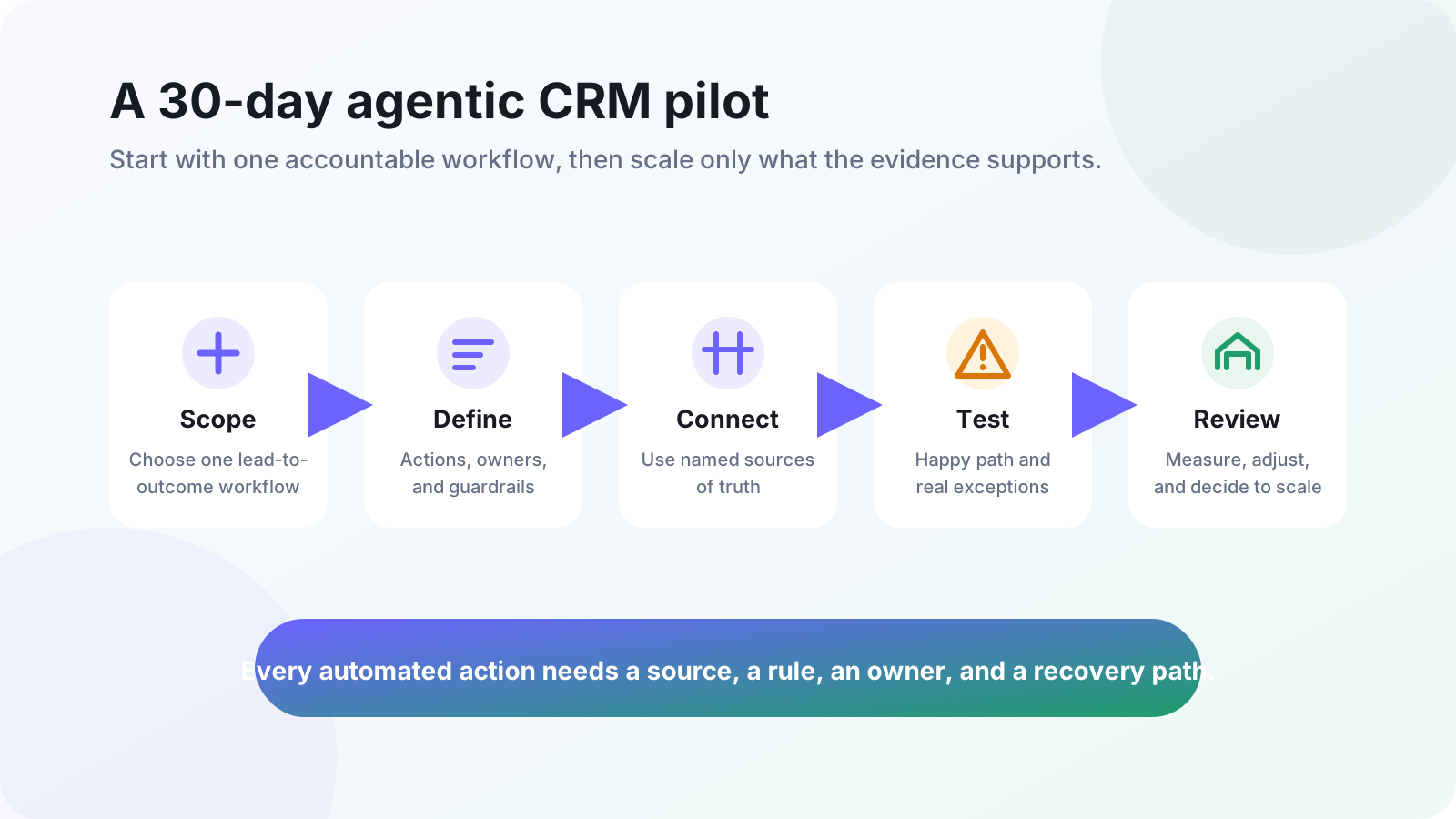
Before day one: choose a pilot that can be audited
Pick one high-intent journey with a clear start, a useful end state, and a human owner. Good candidates include responding to an inbound inquiry, recovering an incomplete form, qualifying a consultation request, or following up after a missed call. Avoid a first pilot that spans every channel, every service line, and every customer segment.
Write the outcome in one sentence: “When a qualified lead requests a consultation, the workflow offers a valid slot and records the result.” If the outcome cannot be stated that plainly, the workflow is too broad to test. For the category-level distinction, start with agentic CRM vs. traditional CRM.
Days 1–5: map the current workflow and define success
Watch the workflow as staff handle it today. Record the trigger, the information they use, the action they take, the systems they update, and the cases they escalate. The goal is to preserve the decisions that make the team effective—not to automate a vague description of their job.
Build a simple workflow contract
- Trigger: the event that starts the workflow, such as a form submission or unanswered call.
- Required context: the fields and conversation history needed to make the next decision.
- Allowed actions: actions the workflow may take without waiting for a person.
- Guardrails: rules that block, limit, or route an action.
- Escalation: who owns an exception and how quickly they should see it.
- System of record: the named tool that owns each important fact, such as availability or lead status.
Do not call a workflow “working” merely because it sends a message. Define a small measurement set that matches its purpose: leads received, leads with a completed response, qualified routes, confirmed next steps, staffed exceptions, and the reason each exception occurred. The lead-source attribution guide can help preserve the source and campaign context needed to interpret those results.
Days 6–10: connect sources of truth and add controls
Every action needs a current source of truth. A booking workflow should read live availability from the calendar or scheduling system that owns the appointment. A follow-up workflow should write its outcome back to the lead record that the team actually uses. Never make an agent guess from an old export, copied spreadsheet, or incomplete summary.
Add the controls before testing real leads. Specify which actions require human approval, which messages need approved templates, what the workflow must never promise, and how it should handle missing or conflicting data. When a rule is not satisfied, the correct action is an owned task with context—not a made-up answer or a silently dropped lead.
Start with the smallest permission set
Give the pilot only the access it needs for its defined workflow. Keep a record of the connected accounts, fields, and actions. Confirm that a staff member can inspect the activity history, correct a result, and recover the original customer context. This is as important for a small team as it is for a large one: a workflow cannot be operated responsibly if nobody can explain what happened.
If the pilot includes moving records or lead routing from another CRM, use the SMB CRM migration checklist to separate data cutover work from the workflow experiment. A pilot is much easier to evaluate when its data path is explicit and reversible.
Days 11–15: test the happy path and the exceptions
Test with staff before opening the pilot to all inbound demand. Run the normal path first, then deliberately create the situations that cause trouble: a duplicate lead, a changed service request, unavailable time, incomplete contact details, an integration outage, an opt-out, and a request that needs a person.
For each test, verify four things: the customer receives an appropriate response; the source of truth stays correct; the CRM records enough context for the next owner; and an exception reaches a named person. The appointment-booking launch checklist shows the same discipline for calendar-heavy workflows.
Days 16–30: run a controlled pilot and review it weekly
Start with a clearly bounded audience, channel, or appointment type. Tell the team what is in scope, where to report a problem, and which existing process remains the fallback. Review the activity weekly with the people who own the workflow—not just the person who configured it.
Use the review to look for patterns rather than isolated anecdotes. Are leads reaching the right next step? Are the same exception reasons recurring? Is staff spending less time on mechanical work while retaining control over judgment calls? If the workflow creates a new kind of error, fix the rule or narrow the scope before increasing volume.
A pilot review agenda
- Inspect a sample of completed conversations and actions end to end.
- Compare the intended workflow contract with the actual activity history.
- Group exceptions by cause: missing data, unclear rule, integration problem, or human judgment.
- Decide whether to fix, keep testing, scale one part, or stop the workflow.
- Record the owner and due date for every change before the next review.
What to scale after the pilot
Scale the proven workflow one dimension at a time: another lead source, service type, team member, or action. Keep the same operating contract and add a new test case whenever the scope changes. This gives you a durable system instead of a collection of disconnected automations.
If you are deciding among platforms, use the pilot as your demo script. The AI CRM buyer's guide explains the capabilities and vendor questions to compare. For a look at Legion's connected workflow, visit the AI CRM platform page or explore lead follow-up automation.
Continue exploring this topic
The SMB CRM Migration Checklist: Switch Without Losing a Single Lead
Migrating CRMs scares owners for one reason: fear of losing pipeline. Here's the exact checklist we use with Legion customers.
ReadBest AI CRM for Small Business in 2026: A Practical Shortlist
A workflow-first AI CRM shortlist for small businesses: where Legion, HubSpot, and Salesforce fit, plus the questions to test in every demo.
ReadAgentic CRM vs Traditional CRM: What Actually Changes in 2026
Traditional CRMs store data. Agentic CRMs take action. Here's the honest side-by-side and how to know when it's time to switch.
Read